Monthly Salary Formula
The monthly salary formula is determined by the Full Time Equivalent (FTE) amount multiplied by the salary and divided by 12.
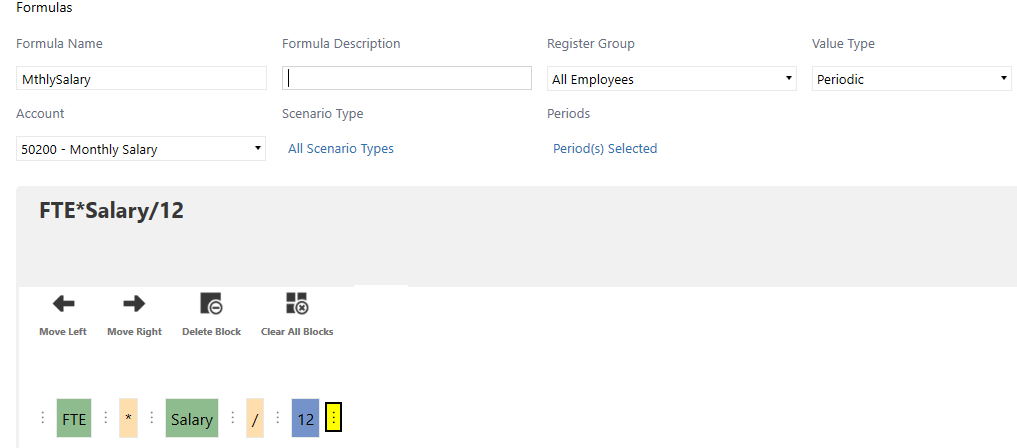
There are two different options for creating this formula:
-
Option 1: Select each formula block.
-
Option 2: Type the formula in the text field of the Text tab.
Option 1
Follow these instructions to create this formula by selecting each block:
-
Populate the formula criteria:
-
Formula Name: Monthly Salary
-
(Optional) Formula Description
-
Register Group: All Employees
-
Value Type: Periodic
-
Account: 50200 - Monthly Salary
-
Scenario Type: All Scenarios
-
Periods: All periods selected

-
-
Click the Register tab, select FTE from the drop-down menu and click the Add To Formula button.
-
Click the * operator block.
-
Click the Register tab, select Salary from the drop-down menu and click the Add To Formula button.
-
Click the / operator block.
-
Click the Text tab, type 12 in the text field and click the Add To Formula button.
-
Click the Save button. You will receive a confirmation message with the option to create another formula or return to the formula library.
Option 2
Follow these instructions to create this formula by typing the formula in the Text tab:
-
Populate the formula criteria:
-
Formula Name: Monthly Salary
-
(Optional) Formula Description
-
Register Group: All Employees
-
Value Type: Periodic
-
Account: 50200 - Monthly Salary
-
Scenario Type: All Scenarios
-
Periods: All periods selected
-
-
Click the Text tab, type FTE*Salary/12 in the text field and click the Add To Formula button.
-
Click the Save button. You will receive a confirmation message with the option to create another formula or return to the formula library.


